
New Features in QTP 8.2?
Please friends to contribute questions of company interviews you attended mail us cinterviews.blogspot.com@gmail.com it will be useful for our job search community.www.cinterviews.com appreciates your contribution
Keyword View: Lets you easily build and maintain tests without writing VBScripts.
Auto-Documentation: Provides improved test clarity and the ability to view test steps in plain English.
Step Generator: Allows you to quickly insert custom-built functions into your tests.
Mercury Business Process Testing: Enhanced integration with BPT -- Business Components, Scripted Components, and Application Areas.
Enhanced Expert View: Provides greater efficiency when generalizing test components.
Action Parameters: Allows you to generalize testing actions for greater reusability.
Data Parameters: You can now specify test or action parameters to pass values into and from your test, and between actions in your test.
Open XML Report Format for Test Results: Test results are now stored in an open XML format, enabling you to easily customize the reports according to your own requirements, and to integrate the test result information with other applications.
Unicode Support: Lets you test global deployments of your enterprise applications.
Function Definition Generator: You can use the new Function Definition Generator to generate definitions for user-defined functions, add header information to them, and register functions to a test object.
Please friends to contribute questions of company interviews you attended mail us cinterviews.blogspot.com@gmail.com it will be useful for our job search community.www.cinterviews.com appreciates your contribution
Showing posts with label latest qtp interview questions. Show all posts
Showing posts with label latest qtp interview questions. Show all posts
What is Quick Test Professional QTP?
What is Quick Test Professional QTP?
Mercury QuickTest Professional™ provides the industry’s best solution for functional test and regression test automation - addressing every major software application and environment. This next-generation automated testing solution deploys the concept of Keyword-driven testing to radically simplify test creation and maintenance. Unique to QuickTest Professional’s Keyword-driven approach, test automation experts have full access to the underlying test and object properties, via an integrated scripting and debugging environment that is round-trip synchronized with the Keyword View.QuickTest Professional satisfies the needs of both technical and non-technical users. It enables you to deploy higher-quality applications faster, cheaper, and with less risk. It works hand-in-hand with Mercury Business Process Testing™ to bring non-technical subject matter experts into the quality process in a meaningful way. Plus, it empowers the entire testing team to create sophisticated test suites with minimal training.The deployment of Mercury QuickTest Professional is optimized through the use of Mercury best practices. Mercury best practices cover all aspects of deployment, including product installation and operation, organizational design, process implementation, continual process improvement and measurement of return on investment (ROI). Throughout your implementation Mercury applies these best practices to your specific situation, creating world-class procedures for you that drive long-term success.source.
Please friends to contribute questions of company interviews you attended mail us cinterviews.blogspot.com@gmail.com it will be useful for our job search community.www.cinterviews.com appreciates your contribution
Mercury QuickTest Professional™ provides the industry’s best solution for functional test and regression test automation - addressing every major software application and environment. This next-generation automated testing solution deploys the concept of Keyword-driven testing to radically simplify test creation and maintenance. Unique to QuickTest Professional’s Keyword-driven approach, test automation experts have full access to the underlying test and object properties, via an integrated scripting and debugging environment that is round-trip synchronized with the Keyword View.QuickTest Professional satisfies the needs of both technical and non-technical users. It enables you to deploy higher-quality applications faster, cheaper, and with less risk. It works hand-in-hand with Mercury Business Process Testing™ to bring non-technical subject matter experts into the quality process in a meaningful way. Plus, it empowers the entire testing team to create sophisticated test suites with minimal training.The deployment of Mercury QuickTest Professional is optimized through the use of Mercury best practices. Mercury best practices cover all aspects of deployment, including product installation and operation, organizational design, process implementation, continual process improvement and measurement of return on investment (ROI). Throughout your implementation Mercury applies these best practices to your specific situation, creating world-class procedures for you that drive long-term success.source.
Please friends to contribute questions of company interviews you attended mail us cinterviews.blogspot.com@gmail.com it will be useful for our job search community.www.cinterviews.com appreciates your contribution
What is a project file? How can you produce one for your project?
What is a project file? How can you produce one for your project? Qt interview Question
· Projects are described by the contents of project (.pro) files. The information within these is used by qmake to generate a Makefile containing all the commands that are needed to build each project.
· you only need to run qmake [ a project-oriented system for managing the build process for applications, libraries, and other components] on this project file.
· By default, qmake generates a Makefile that you use to build the project, and you can run your platform's make tool to build the project.
· Projects are described by the contents of project (.pro) files. The information within these is used by qmake to generate a Makefile containing all the commands that are needed to build each project.
· you only need to run qmake [ a project-oriented system for managing the build process for applications, libraries, and other components] on this project file.
· By default, qmake generates a Makefile that you use to build the project, and you can run your platform's make tool to build the project.
Basic QT Tutorial
Basic Understanding of QT/ Tutorial for QT
Qt is cross platform UI widget toolkit, but also more that that. It is extensive application development framework and suitable also for implementing non-GUI related programs.
Qt supports symbian, maemo, windowsCE mobile platforms.
Qt API is implemented in C++.bindings for other languages like python, java, ruby also exist.
Qt Cross Platform Architecture.

The implementation of qt uses the private implementation programming idiom which separates the interfaces from the platform specific changes. the application just needs to be re-complied for the target platform in the corresponding development environment.
Qt Class Library

Qt object model
Qt expands C++ with Meta Object Model, it adds the following features to c++.
• Hierarchical and query-able object trees.
• Signals and slots mechanism for object communication.
• Events, Event-Filters and Timers.
• String Translation.
• Guarded pointers.
• RTTI[Type Identification and dynamic casting]
• Discoverable object properties.
QObject hierarchy tree
• QObject is the heart of Qt object model and base class of all Qt Objects.
It provides object trees and object ownership with parent-child relationship.
• A parent owns its children, the mechanism provides memory management for object trees, but no garbage collection for other allocations.
• Parent controls the childrens visibility,but a child object can be explicitly hidden.
Object Tree

Here The top most dialog that has a layout set and a push-button that is outside the layout.
within the horizontal layout there is a label,line-edit and a push-button.
Meta –object system
Meta –object system is based on 3 things.
• QObject class
• QObject macro
• Meta object compiler
• The QObject base class has capabilities to support meta object system(connect method that connects a signal to a slot.)
• Q_OBJECT which is declared inside the private section of the class,states that it requires meta object compiler.
• Meta object compiler is executed automatically before the actual compilation,it generates the c++ code which required for the compilation process.
QApplication
QApplication is the one class that handles event loop and the main settings of an application.
No matter howmany widgets may present in an application there must exist one QApplication instance.
The responsibilities of QApplication includes
• Perform event handling.
• Manage application settings like[screen size,font,application stylesheet and many other tasks].
Events in Qt
When something of interest for the application occurs,for example
A key is pressed,
A mouse is moved,
A Network packet has arrived.
Then an event is created. It is represented as an object of the QEvent class. such as QFocusEvent.Information about the event is enclosed with in this event object.
Events are received and handled by event handlers of QObject.The actual event handler depends on the type of event that has occurred. like if the event mouse movement occurs it is handled by
mouseMoveEvent event handler.
Events are mostly created by the underlying window system but they can also be created by the developer too.The application contains an eventloop that manages and sends event to the objects they are meant for.Eventloop is started by calling the QApplication “exec” method after initilisation,in the beginning of every Qt application.typically in the main function.
Generally,no longer interaction can take place before starting this main event loop.
Signals and Slots
signals and slots offer a way to communicate between QObjects.
A Signal can be emitted by a QObject.
A Slot is a member function which can be connected to a particular slot, or can be called in response to a particluar emitted signal call.
Many predefined signals and slots exist.but subclasses can define and add their own ones.
Signature of signal should match the receiving slot.Another common way to implement observer design pattern is to declare an interface class which is then implemented by all observers.
Signals and Slots are easier to use and they dont need to implement an interface.
Signals and Slots offer loose coupling with many to many relationship by nature.it means a class which emits a signal need not know to which slot it is going to connect to.
Signals
A signal is a way to inform a possible observer that something of interest has occurred in side the observer class.
Some example are.
1.A Http request has been sent to a server and asynchronous handling of request has been finished.
QHttp emits a “requestFinished(int id,bool error)”.
2.A value of slider has been changed.
Qslider emits a valueChanged(int value) signal.
3.A Pushbutton has been clicked.
QPushButton emits a clicked(bool checked) signal.
Signals are sent using the keyword “emit”.
Signals are declared by the developer and implemented by the "moc"[meta object compiler.]
1.Signals can never have return type.[void or any return type is not allowed for signals]
2.signals can take any number of arguments.
3.Inorder to connect a signal with a slot the signature of the signal should match with the receiving slot.
And the number of arguments should be equal to the arguments of the slot.
Qt is cross platform UI widget toolkit, but also more that that. It is extensive application development framework and suitable also for implementing non-GUI related programs.
Qt supports symbian, maemo, windowsCE mobile platforms.
Qt API is implemented in C++.bindings for other languages like python, java, ruby also exist.
Qt Cross Platform Architecture.

The implementation of qt uses the private implementation programming idiom which separates the interfaces from the platform specific changes. the application just needs to be re-complied for the target platform in the corresponding development environment.
Qt Class Library

Qt object model
Qt expands C++ with Meta Object Model, it adds the following features to c++.
• Hierarchical and query-able object trees.
• Signals and slots mechanism for object communication.
• Events, Event-Filters and Timers.
• String Translation.
• Guarded pointers.
• RTTI[Type Identification and dynamic casting]
• Discoverable object properties.
QObject hierarchy tree
• QObject is the heart of Qt object model and base class of all Qt Objects.
It provides object trees and object ownership with parent-child relationship.
• A parent owns its children, the mechanism provides memory management for object trees, but no garbage collection for other allocations.
• Parent controls the childrens visibility,but a child object can be explicitly hidden.
Object Tree
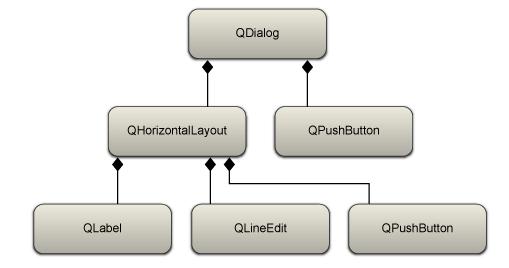
Here The top most dialog that has a layout set and a push-button that is outside the layout.
within the horizontal layout there is a label,line-edit and a push-button.
Meta –object system
Meta –object system is based on 3 things.
• QObject class
• QObject macro
• Meta object compiler
• The QObject base class has capabilities to support meta object system(connect method that connects a signal to a slot.)
• Q_OBJECT which is declared inside the private section of the class,states that it requires meta object compiler.
• Meta object compiler is executed automatically before the actual compilation,it generates the c++ code which required for the compilation process.
QApplication
QApplication is the one class that handles event loop and the main settings of an application.
No matter howmany widgets may present in an application there must exist one QApplication instance.
The responsibilities of QApplication includes
• Perform event handling.
• Manage application settings like[screen size,font,application stylesheet and many other tasks].
Events in Qt
When something of interest for the application occurs,for example
A key is pressed,
A mouse is moved,
A Network packet has arrived.
Then an event is created. It is represented as an object of the QEvent class. such as QFocusEvent.Information about the event is enclosed with in this event object.
Events are received and handled by event handlers of QObject.The actual event handler depends on the type of event that has occurred. like if the event mouse movement occurs it is handled by
mouseMoveEvent event handler.
Events are mostly created by the underlying window system but they can also be created by the developer too.The application contains an eventloop that manages and sends event to the objects they are meant for.Eventloop is started by calling the QApplication “exec” method after initilisation,in the beginning of every Qt application.typically in the main function.
Generally,no longer interaction can take place before starting this main event loop.
Signals and Slots
signals and slots offer a way to communicate between QObjects.
A Signal can be emitted by a QObject.
A Slot is a member function which can be connected to a particular slot, or can be called in response to a particluar emitted signal call.
Many predefined signals and slots exist.but subclasses can define and add their own ones.
Signature of signal should match the receiving slot.Another common way to implement observer design pattern is to declare an interface class which is then implemented by all observers.
Signals and Slots are easier to use and they dont need to implement an interface.
Signals and Slots offer loose coupling with many to many relationship by nature.it means a class which emits a signal need not know to which slot it is going to connect to.
Signals
A signal is a way to inform a possible observer that something of interest has occurred in side the observer class.
Some example are.
1.A Http request has been sent to a server and asynchronous handling of request has been finished.
QHttp emits a “requestFinished(int id,bool error)”.
2.A value of slider has been changed.
Qslider emits a valueChanged(int value) signal.
3.A Pushbutton has been clicked.
QPushButton emits a clicked(bool checked) signal.
Signals are sent using the keyword “emit”.
Signals are declared by the developer and implemented by the "moc"[meta object compiler.]
1.Signals can never have return type.[void or any return type is not allowed for signals]
2.signals can take any number of arguments.
3.Inorder to connect a signal with a slot the signature of the signal should match with the receiving slot.
And the number of arguments should be equal to the arguments of the slot.
New QTP Interview Questions and Answers
New QTP Interview Questions and Answers
1)Tell me the features and importance of Quick test professional(QTP)?
1. Key word driven testing
2. Suitable to web applications
3. Vb script as the script language
4. Better error handling mechanism
5. Excellent data driven testing features
6. Record and playback
7. to store a values we can use runtime data table
8. Auto documentation
2)Can a QTP user can increase or decrease active screen information with the test?
Yes, user can store.
3)What are the limitations of QTP?
The limitations listed below are specifically for QTP 8.2:
Maximum length of name—255
Maximum length of format string—255
Maximum number of tables (workbooks)—Limited by system resources (windows and memory)
Column width—0 to 255 characters
Text length—16,383 characters
Formula length—1024 characters
Number precision—15 digits
Largest positive number—9.99999999999999E307
Largest negative number— -9.99999999999999E307
Smallest positive number—1E-307
Smallest negative number— -1E-307
Maximum number of names per workbook—Limited by available memory
Maximum worksheet size—65,536 rows by 256 columns
4)What are the QTP Script Coding Standards?
at the start In Header section of QTP you have to declare these items
***Header Section of the QTP you have to Mention*****
1.Name of the Script
2.Name of the Test case
3.Name of the Reusable scripts
4.Path of the Excel sheet
5.Version
6.Name of the Tester
7.Change History
*******************************
Then you have to follow Naming convention for each of the script that you will create in QTP.Like Y_TRA_AGIALANT_FINANCE_01
*******************************
You have to follow coding standards for the variable that you will declare in the QTP script
Like For all the
Integer type variable the name should start with int
Character type variable the name should start with Char
Boolean type variable the name should start with Boo
String Type variable the name should start with Str
*****************************************************
Then throughout the QTP script you have to mention that what you are doing actually. Like
**Here you have to mention in the script what you are doing ** Like
**Clicking the yahoo signin button to Login **********
Browswer(Yahoo page).Page(Yahoo_1).Button(Sign_in).Click
*************************************************
Coding standard are used for readability and better understanding.
1)Tell me the features and importance of Quick test professional(QTP)?
1. Key word driven testing
2. Suitable to web applications
3. Vb script as the script language
4. Better error handling mechanism
5. Excellent data driven testing features
6. Record and playback
7. to store a values we can use runtime data table
8. Auto documentation
2)Can a QTP user can increase or decrease active screen information with the test?
Yes, user can store.
3)What are the limitations of QTP?
The limitations listed below are specifically for QTP 8.2:
Maximum length of name—255
Maximum length of format string—255
Maximum number of tables (workbooks)—Limited by system resources (windows and memory)
Column width—0 to 255 characters
Text length—16,383 characters
Formula length—1024 characters
Number precision—15 digits
Largest positive number—9.99999999999999E307
Largest negative number— -9.99999999999999E307
Smallest positive number—1E-307
Smallest negative number— -1E-307
Maximum number of names per workbook—Limited by available memory
Maximum worksheet size—65,536 rows by 256 columns
4)What are the QTP Script Coding Standards?
at the start In Header section of QTP you have to declare these items
***Header Section of the QTP you have to Mention*****
1.Name of the Script
2.Name of the Test case
3.Name of the Reusable scripts
4.Path of the Excel sheet
5.Version
6.Name of the Tester
7.Change History
*******************************
Then you have to follow Naming convention for each of the script that you will create in QTP.Like Y_TRA_AGIALANT_FINANCE_01
*******************************
You have to follow coding standards for the variable that you will declare in the QTP script
Like For all the
Integer type variable the name should start with int
Character type variable the name should start with Char
Boolean type variable the name should start with Boo
String Type variable the name should start with Str
*****************************************************
Then throughout the QTP script you have to mention that what you are doing actually. Like
**Here you have to mention in the script what you are doing ** Like
**Clicking the yahoo signin button to Login **********
Browswer(Yahoo page).Page(Yahoo_1).Button(Sign_in).Click
*************************************************
Coding standard are used for readability and better understanding.
Subscribe to:
Posts (Atom)
