
www.cinterviews.com appreciates your contribution please mail us the questions you have to cinterviews.blogspot.com@gmail.com so that it will be useful to our job search community
Kony labs C++ QT interview questions
1) In exception handling how many ways can we throw exception.
2) Reverse string Program
3) Difference between copy constructor and assignment operator.
4) implement a simple copy constructor. why to we implement our own
5) Why we use QT framework?
6)What is RTTI?
7)Some questions on STL?
8)Which design patterns you used and why explain?
9)What are all the Os QT supports ? do i need to compile again for every Operating system?
10)What is Qpointer?
11)What is dpointer?
12)Which version of Qt you used?
13)Some more questions on Qt not able to remember now.
Showing posts with label basic qt tutorials. Show all posts
Showing posts with label basic qt tutorials. Show all posts
What does the TEMPLATE variable mean in the qmake project file?
What does the TEMPLATE variable mean in the qmake project file? What are possible values?
TEMPLATE variable contains the name of the template to use when generating the project. The allowed values are:
# app - Creates a Makefile for building applications (the default).
# lib - Creates a Makefile for building libraries
# subdirs - Creates a Makefile for building targets in subdirectories.
# vcapp - Windows only Creates an application project for Visual Studio.
# vclib - Windows only Creates a library project for Visual Studio
What is a Makefile? How can you produce a Makefile for your project?
What is a Makefile? How can you produce a Makefile for your project?
C++ applications are generally composed of many source files, header files, and external libraries.Keeping track of all of the parts of such a application requires a mechanism that precisely specifies the input files involved, the tools needed to build, the intermediate targets and their dependencies, and the final executable target.
C++ applications are generally composed of many source files, header files, and external libraries.Keeping track of all of the parts of such a application requires a mechanism that precisely specifies the input files involved, the tools needed to build, the intermediate targets and their dependencies, and the final executable target.
The most widely used utility for handling the job of building a project is make.
make reads the details of the project specifications and the instructions for the compiler from a Makefile.
With Qt, it is not necessary to write Makefiles. Qt provides a tool called qmake to generate Makefiles.
Depending on the development environment, developers may use variants of make, such as mingw32-make, gmake, or unsermake ,nmake in MS Dev Studio.
What is MVC architecture QT?
What is MVC architecture? How is it organized?
The MVC Architecture
MVC lies at the core of most of the programming languages.Model, View, Controller architecture, usually just called MVC.
MVC benefits include:
Isolation of business logic from the user interface
Ease of keeping code DRY
Making it clear where different types of code belong for easier maintenance
Models
A model represents the information (data) of the application and the rules to manipulate that data, In most cases, one table in your database will correspond to one model in your application. Most of the application’s business logic will be concentrated in the models.
In Qt, the standard interface for model is defined by the QAbstractItemModel class.
Views
Views represent the user interface of your application.
Views handle the job of providing data to the web browser or other tool that is used to make requests from your application.
In Qt, the standard interface for model is defined by the QAbstractItemView class.
The separation of content and presentation is achieved by the use of a standard model interface provided by QAbstractItemModel, a standard view interface provided by QAbstractItemView,
Controllers – in Qt more responsible feature (Delegates)
Controllers provide the “glue” between models and views. Generally controllers are responsible for processing the incoming requests from the web browser, interrogating the models for data, and passing that data on to the views for presentation.
In Qt, the standard interface for controlling delegates is defined in the QAbstractItemDelegate class.
Assignment operators Qt4 deep or shallow copy?
Does assignment operators in Qt4 return deep or shallow copy?
Ans :Most objects in Qt implement copy-on-write mechanism. That means a shallow copy, this becomes a deep one as soon as you try to change it.Striking features of QT?
What are the striking features of QT?
Events and EventFilters
Metaobject system-object communication mechanism,dynamic property system
Object properties
Object Trees
Signals and Slots
UIC,MOC
QPointer(Guarded pointers)
String Translation(Internationalization)
Events and EventFilters
Metaobject system-object communication mechanism,dynamic property system
Object properties
Object Trees
Signals and Slots
UIC,MOC
QPointer(Guarded pointers)
String Translation(Internationalization)
Basic QT Tutorial
Basic Understanding of QT/ Tutorial for QT
Qt is cross platform UI widget toolkit, but also more that that. It is extensive application development framework and suitable also for implementing non-GUI related programs.
Qt supports symbian, maemo, windowsCE mobile platforms.
Qt API is implemented in C++.bindings for other languages like python, java, ruby also exist.
Qt Cross Platform Architecture.

The implementation of qt uses the private implementation programming idiom which separates the interfaces from the platform specific changes. the application just needs to be re-complied for the target platform in the corresponding development environment.
Qt Class Library

Qt object model
Qt expands C++ with Meta Object Model, it adds the following features to c++.
• Hierarchical and query-able object trees.
• Signals and slots mechanism for object communication.
• Events, Event-Filters and Timers.
• String Translation.
• Guarded pointers.
• RTTI[Type Identification and dynamic casting]
• Discoverable object properties.
QObject hierarchy tree
• QObject is the heart of Qt object model and base class of all Qt Objects.
It provides object trees and object ownership with parent-child relationship.
• A parent owns its children, the mechanism provides memory management for object trees, but no garbage collection for other allocations.
• Parent controls the childrens visibility,but a child object can be explicitly hidden.
Object Tree

Here The top most dialog that has a layout set and a push-button that is outside the layout.
within the horizontal layout there is a label,line-edit and a push-button.
Meta –object system
Meta –object system is based on 3 things.
• QObject class
• QObject macro
• Meta object compiler
• The QObject base class has capabilities to support meta object system(connect method that connects a signal to a slot.)
• Q_OBJECT which is declared inside the private section of the class,states that it requires meta object compiler.
• Meta object compiler is executed automatically before the actual compilation,it generates the c++ code which required for the compilation process.
QApplication
QApplication is the one class that handles event loop and the main settings of an application.
No matter howmany widgets may present in an application there must exist one QApplication instance.
The responsibilities of QApplication includes
• Perform event handling.
• Manage application settings like[screen size,font,application stylesheet and many other tasks].
Events in Qt
When something of interest for the application occurs,for example
A key is pressed,
A mouse is moved,
A Network packet has arrived.
Then an event is created. It is represented as an object of the QEvent class. such as QFocusEvent.Information about the event is enclosed with in this event object.
Events are received and handled by event handlers of QObject.The actual event handler depends on the type of event that has occurred. like if the event mouse movement occurs it is handled by
mouseMoveEvent event handler.
Events are mostly created by the underlying window system but they can also be created by the developer too.The application contains an eventloop that manages and sends event to the objects they are meant for.Eventloop is started by calling the QApplication “exec” method after initilisation,in the beginning of every Qt application.typically in the main function.
Generally,no longer interaction can take place before starting this main event loop.
Signals and Slots
signals and slots offer a way to communicate between QObjects.
A Signal can be emitted by a QObject.
A Slot is a member function which can be connected to a particular slot, or can be called in response to a particluar emitted signal call.
Many predefined signals and slots exist.but subclasses can define and add their own ones.
Signature of signal should match the receiving slot.Another common way to implement observer design pattern is to declare an interface class which is then implemented by all observers.
Signals and Slots are easier to use and they dont need to implement an interface.
Signals and Slots offer loose coupling with many to many relationship by nature.it means a class which emits a signal need not know to which slot it is going to connect to.
Signals
A signal is a way to inform a possible observer that something of interest has occurred in side the observer class.
Some example are.
1.A Http request has been sent to a server and asynchronous handling of request has been finished.
QHttp emits a “requestFinished(int id,bool error)”.
2.A value of slider has been changed.
Qslider emits a valueChanged(int value) signal.
3.A Pushbutton has been clicked.
QPushButton emits a clicked(bool checked) signal.
Signals are sent using the keyword “emit”.
Signals are declared by the developer and implemented by the "moc"[meta object compiler.]
1.Signals can never have return type.[void or any return type is not allowed for signals]
2.signals can take any number of arguments.
3.Inorder to connect a signal with a slot the signature of the signal should match with the receiving slot.
And the number of arguments should be equal to the arguments of the slot.
Qt is cross platform UI widget toolkit, but also more that that. It is extensive application development framework and suitable also for implementing non-GUI related programs.
Qt supports symbian, maemo, windowsCE mobile platforms.
Qt API is implemented in C++.bindings for other languages like python, java, ruby also exist.
Qt Cross Platform Architecture.

The implementation of qt uses the private implementation programming idiom which separates the interfaces from the platform specific changes. the application just needs to be re-complied for the target platform in the corresponding development environment.
Qt Class Library

Qt object model
Qt expands C++ with Meta Object Model, it adds the following features to c++.
• Hierarchical and query-able object trees.
• Signals and slots mechanism for object communication.
• Events, Event-Filters and Timers.
• String Translation.
• Guarded pointers.
• RTTI[Type Identification and dynamic casting]
• Discoverable object properties.
QObject hierarchy tree
• QObject is the heart of Qt object model and base class of all Qt Objects.
It provides object trees and object ownership with parent-child relationship.
• A parent owns its children, the mechanism provides memory management for object trees, but no garbage collection for other allocations.
• Parent controls the childrens visibility,but a child object can be explicitly hidden.
Object Tree
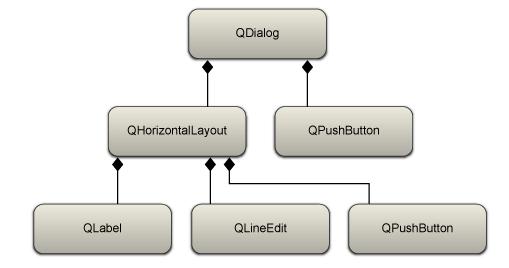
Here The top most dialog that has a layout set and a push-button that is outside the layout.
within the horizontal layout there is a label,line-edit and a push-button.
Meta –object system
Meta –object system is based on 3 things.
• QObject class
• QObject macro
• Meta object compiler
• The QObject base class has capabilities to support meta object system(connect method that connects a signal to a slot.)
• Q_OBJECT which is declared inside the private section of the class,states that it requires meta object compiler.
• Meta object compiler is executed automatically before the actual compilation,it generates the c++ code which required for the compilation process.
QApplication
QApplication is the one class that handles event loop and the main settings of an application.
No matter howmany widgets may present in an application there must exist one QApplication instance.
The responsibilities of QApplication includes
• Perform event handling.
• Manage application settings like[screen size,font,application stylesheet and many other tasks].
Events in Qt
When something of interest for the application occurs,for example
A key is pressed,
A mouse is moved,
A Network packet has arrived.
Then an event is created. It is represented as an object of the QEvent class. such as QFocusEvent.Information about the event is enclosed with in this event object.
Events are received and handled by event handlers of QObject.The actual event handler depends on the type of event that has occurred. like if the event mouse movement occurs it is handled by
mouseMoveEvent event handler.
Events are mostly created by the underlying window system but they can also be created by the developer too.The application contains an eventloop that manages and sends event to the objects they are meant for.Eventloop is started by calling the QApplication “exec” method after initilisation,in the beginning of every Qt application.typically in the main function.
Generally,no longer interaction can take place before starting this main event loop.
Signals and Slots
signals and slots offer a way to communicate between QObjects.
A Signal can be emitted by a QObject.
A Slot is a member function which can be connected to a particular slot, or can be called in response to a particluar emitted signal call.
Many predefined signals and slots exist.but subclasses can define and add their own ones.
Signature of signal should match the receiving slot.Another common way to implement observer design pattern is to declare an interface class which is then implemented by all observers.
Signals and Slots are easier to use and they dont need to implement an interface.
Signals and Slots offer loose coupling with many to many relationship by nature.it means a class which emits a signal need not know to which slot it is going to connect to.
Signals
A signal is a way to inform a possible observer that something of interest has occurred in side the observer class.
Some example are.
1.A Http request has been sent to a server and asynchronous handling of request has been finished.
QHttp emits a “requestFinished(int id,bool error)”.
2.A value of slider has been changed.
Qslider emits a valueChanged(int value) signal.
3.A Pushbutton has been clicked.
QPushButton emits a clicked(bool checked) signal.
Signals are sent using the keyword “emit”.
Signals are declared by the developer and implemented by the "moc"[meta object compiler.]
1.Signals can never have return type.[void or any return type is not allowed for signals]
2.signals can take any number of arguments.
3.Inorder to connect a signal with a slot the signature of the signal should match with the receiving slot.
And the number of arguments should be equal to the arguments of the slot.
Working with QT Tools
QT Tools
QtDesigner Classes for extending Qt Designer
QtUiTools TO Create userinterfaces from .ui-files at run time
QtHelp Classes for online help
QtAssistant Support for online help
QtTest Tool classes for unit testing
QtDesigner Classes for extending Qt Designer
QtUiTools TO Create userinterfaces from .ui-files at run time
QtHelp Classes for online help
QtAssistant Support for online help
QtTest Tool classes for unit testing
QT Modules for general software development
Qt Modules
Modules for general software development using QT
QtCore for Core non-graphical classes used by other modules
QtGui for Graphical user interface (GUI) components
QtNetwork Classes for network programming
QtOpenGL for OpenGL support classes
QtScript Classes for evaluating Qt Scripts
QtSql Classes for database integration using SQL
QtSvg Classes for displaying contentsof SVG files
QtWebKit Classes for displaying and editing web content
QtXml Classes for handling XML
QtXmlPatterns An XQuery& XPathengine for XML and custom data models
Phonon for Multimedia framework classes
Qt3Support for Qt 3 compatibilityclasses
Modules for general software development using QT
QtCore for Core non-graphical classes used by other modules
QtGui for Graphical user interface (GUI) components
QtNetwork Classes for network programming
QtOpenGL for OpenGL support classes
QtScript Classes for evaluating Qt Scripts
QtSql Classes for database integration using SQL
QtSvg Classes for displaying contentsof SVG files
QtWebKit Classes for displaying and editing web content
QtXml Classes for handling XML
QtXmlPatterns An XQuery& XPathengine for XML and custom data models
Phonon for Multimedia framework classes
Qt3Support for Qt 3 compatibilityclasses

QT Architecture
QT Architecture
●Qt uses native styles to draw UI
Widgets emulate exact look & feel
Can be adapted by the developer
●Built on low level APIs of platform
MFC, Motif, ...: layered toolkits with thin wrappers.Less performance, less flexibility
●Cross-platform
Single source for multiple platforms
Only requires recompilation

●Qt uses native styles to draw UI
Widgets emulate exact look & feel
Can be adapted by the developer
●Built on low level APIs of platform
MFC, Motif, ...: layered toolkits with thin wrappers.Less performance, less flexibility
●Cross-platform
Single source for multiple platforms
Only requires recompilation

What is Maemo
What is Maemo
Linux-based mobile operating system
Developed by Nokia, based on DebianLinux
●N900:First Maemo-device with telephony
Previously: N770, N800, N810 Internet Tablets

Linux-based mobile operating system
Developed by Nokia, based on DebianLinux
●N900:First Maemo-device with telephony
Previously: N770, N800, N810 Internet Tablets

Symbian Future -QT Tutorials for symbian and maemo
Symbian^4: replaces S60 with Qt-based UI
●Components:
Orbit: extension library for Qt, 50+ UI elements tailored for mobile
Direct UI: new app framework based on Orbit
●Availability: end of 2010
●Components:
Orbit: extension library for Qt, 50+ UI elements tailored for mobile
Direct UI: new app framework based on Orbit
●Availability: end of 2010
Symbian OS -How Qt can be used with symbian
Symbian OS
Open mobile operating system
●Ownership:Symbian Foundation
Previously: Symbian Ltd. –company bought by Nokia and OS transferred to the Foundation
●Used by major handset manufacturers:
Nokia, Samsung, Sony Ericsson
Smartphone Sales: 51% Symbian (Q2 2009 –Gartner*)
* http://www.gartner.com/it/page.jsp?id=1126812
Open mobile operating system
●Ownership:Symbian Foundation
Previously: Symbian Ltd. –company bought by Nokia and OS transferred to the Foundation
●Used by major handset manufacturers:
Nokia, Samsung, Sony Ericsson
Smartphone Sales: 51% Symbian (Q2 2009 –Gartner*)
* http://www.gartner.com/it/page.jsp?id=1126812

Platforms on which qt can be used
QT Platforms
All the platforms
Windows
Mac OS
Linux / X11
Embedded Linux
Windows CE
Maemo
Symbian (S60)
Below figure shows the platforms in more details

All the platforms
Windows
Mac OS
Linux / X11
Embedded Linux
Windows CE
Maemo
Symbian (S60)
Below figure shows the platforms in more details

QT Tutorials
Having created a window in last post, we will now go on to make the application quit properly when the user tells it to.
We will also use a font that is more exciting than the default one.
This connect() call establishes a one-way connection between two Qt objects (objects that inherit QObject, directly or indirectly). Every Qt object can have both signals (to send messages) and slots (to receive messages). All widgets are Qt objects, since they inherit QWidget, which in turn inherits QObject.
Here, the clicked() signal of quit is connected to the quit() slot of app, so that when the button is clicked, the application quits.
The Signals and Slots documentation describes this topic in detail.
See last post, for how to create a makefile and build the application.
We will also use a font that is more exciting than the default one.
#include#include #include int main(int argc, char *argv[]) { QApplication app(argc, argv); QPushButton quit("Quit"); quit.resize(75, 30); quit.setFont(QFont("Times", 18, QFont::Bold)); QObject::connect(&quit, SIGNAL(clicked()), &app, SLOT(quit())); quit.show(); return app.exec(); }
Line by Line Walkthrough
#includeSince this program uses QFont, it needs to include
QPushButton quit("Quit");This time, the button says Quit and that's exactly what the program will do when the user clicks the button.quit.resize(75, 30);We've chosen another size for the button since the text is a bit shorter than "Hello world!". We could also have used QFontMetrics to set right size, or let QPushButton choose a reasonable default.
quit.setFont(QFont("Times", 18, QFont::Bold));Here we choose a new font for the button, an 18-point bold font from the Times family. It is also possible to change the default font for the entire application, using QApplication::setFont().QObject::connect(&quit, SIGNAL(clicked()), &app, SLOT(quit()));QObject::connect() is perhaps the most central feature of Qt. Note that connect() is a static function in QObject. Do not confuse it with the connect() function in the Berkeley socket library.
This connect() call establishes a one-way connection between two Qt objects (objects that inherit QObject, directly or indirectly). Every Qt object can have both signals (to send messages) and slots (to receive messages). All widgets are Qt objects, since they inherit QWidget, which in turn inherits QObject.
Here, the clicked() signal of quit is connected to the quit() slot of app, so that when the button is clicked, the application quits.
The Signals and Slots documentation describes this topic in detail.
Running the Application
When you run this program, you will see an even smaller window than in last post, filled with an even smaller button.See last post, for how to create a makefile and build the application.
QT Tutorials
QT is a GUI programming using the Qt toolkit. It doesn't cover everything; the emphasis is on teaching the programming philosophy of GUI programming, and Qt's features are introduced as needed. Some commonly used features are never used in this tutorial.
This first program is a simple "Hello world" example. It contains only the bare minimum you need to get a Qt application up and running. The picture below is a screenshot of this program.
Below is the code :
This line includes the QApplication class definition. There has to be exactly one QApplication object in every GUI application that uses Qt. QApplication manages various application-wide resources, such as the default font and cursor.
QPushButton is a GUI push button that the user can press and release. It manages its own look and feel, like every other QWidget. A widget is a user interface object that can process user input and draw graphics. The programmer can change both the overall look and feel and many minor properties of it (such as color), as well as the widget's content. A QPushButton can show either a text or a QIcon.
int main(int argc, char *argv[]) { The main() function is the entry point to the program. Almost always when using Qt, main() only needs to perform some kind of initialization before passing the control to the Qt library, which then tells the program about the user's actions via events.
The argc parameter is the number of command-line arguments and argv is the array of command-line arguments. This is a standard C++ feature.
QApplication app(argc, argv); The app object is this program's QApplication instance. Here it is created. We pass argc and argv to the QApplication constructor so that it can process certain standard command-line arguments (such as -display under X11). All command-line arguments recognized by Qt are removed from argv, and argc is decremented accordingly. See the QApplication::argv() documentation for details.
The QApplication object must be created before any GUI-related features of Qt are used.
QPushButton hello("Hello world!"); Here, after the QApplication, comes the first GUI-related code: A push button is created.
The button is set up to display the text "Hello world!". Because we don't specify a parent window (as second argument to the QPushButton constructor), the button will be a window of its own, with its own window frame and title bar.
hello.resize(100, 30); The button is set up to be 100 pixels wide and 30 pixels high (excluding the window frame, which is provided by the windowing system). We could call QWidget::move() to assign a specific screen position to the widget, but instead we let the windowing system choose a position.
hello.show(); A widget is never visible when you create it. You must call QWidget::show() to make it visible.
return app.exec(); } This is where main() passes control to Qt. QCoreApplication::exec() will return when the application exits. (QCoreApplication is QApplication's base class. It implements QApplication's core, non-GUI functionality and can be used when developing non-GUI applications.)
In QCoreApplication::exec(), Qt receives and processes user and system events and passes these on to the appropriate widgets.
You should now try to compile and run this program.
The tutorial examples are located in Qt's examples/tutorial directory. They are automatically built when you build Qt.
If you have typed in the source code manually, you will need to follow these instructions: To compile a C++ application, you need to create a makefile. The easiest way to create a makefile for Qt is to use the qmake build tool supplied with Qt. If you've saved main.cpp in its own otherwise empty directory, all you need to do is:
qmake -project qmake The first command tells qmake to create a project file (a .pro file). The second command tells it to create a platform-specific makefile based on the project file. You should now be able to type make (or nmake if you're using Visual Studio) and then run your first Qt application!
This first program is a simple "Hello world" example. It contains only the bare minimum you need to get a Qt application up and running. The picture below is a screenshot of this program.
Below is the code :
#include#include int main(int argc, char *argv[]) { QApplication app(argc, argv); QPushButton hello("Hello world!"); hello.resize(100, 30); hello.show(); return app.exec(); }
Line by Line Walkthrough
#includeThis line includes the QApplication class definition. There has to be exactly one QApplication object in every GUI application that uses Qt. QApplication manages various application-wide resources, such as the default font and cursor.
#includeThis line includes the QPushButton class definition. For each class that's part of the public Qt API, there exists a header file of the same name that contains its definition.
QPushButton is a GUI push button that the user can press and release. It manages its own look and feel, like every other QWidget. A widget is a user interface object that can process user input and draw graphics. The programmer can change both the overall look and feel and many minor properties of it (such as color), as well as the widget's content. A QPushButton can show either a text or a QIcon.
int main(int argc, char *argv[]) { The main() function is the entry point to the program. Almost always when using Qt, main() only needs to perform some kind of initialization before passing the control to the Qt library, which then tells the program about the user's actions via events.
The argc parameter is the number of command-line arguments and argv is the array of command-line arguments. This is a standard C++ feature.
QApplication app(argc, argv); The app object is this program's QApplication instance. Here it is created. We pass argc and argv to the QApplication constructor so that it can process certain standard command-line arguments (such as -display under X11). All command-line arguments recognized by Qt are removed from argv, and argc is decremented accordingly. See the QApplication::argv() documentation for details.
The QApplication object must be created before any GUI-related features of Qt are used.
QPushButton hello("Hello world!"); Here, after the QApplication, comes the first GUI-related code: A push button is created.
The button is set up to display the text "Hello world!". Because we don't specify a parent window (as second argument to the QPushButton constructor), the button will be a window of its own, with its own window frame and title bar.
hello.resize(100, 30); The button is set up to be 100 pixels wide and 30 pixels high (excluding the window frame, which is provided by the windowing system). We could call QWidget::move() to assign a specific screen position to the widget, but instead we let the windowing system choose a position.
hello.show(); A widget is never visible when you create it. You must call QWidget::show() to make it visible.
return app.exec(); } This is where main() passes control to Qt. QCoreApplication::exec() will return when the application exits. (QCoreApplication is QApplication's base class. It implements QApplication's core, non-GUI functionality and can be used when developing non-GUI applications.)
In QCoreApplication::exec(), Qt receives and processes user and system events and passes these on to the appropriate widgets.
You should now try to compile and run this program.
The tutorial examples are located in Qt's examples/tutorial directory. They are automatically built when you build Qt.
If you have typed in the source code manually, you will need to follow these instructions: To compile a C++ application, you need to create a makefile. The easiest way to create a makefile for Qt is to use the qmake build tool supplied with Qt. If you've saved main.cpp in its own otherwise empty directory, all you need to do is:
qmake -project qmake The first command tells qmake to create a project file (a .pro file). The second command tells it to create a platform-specific makefile based on the project file. You should now be able to type make (or nmake if you're using Visual Studio) and then run your first Qt application!
Running the Application
When you run the application, you will see a small window filled with a single button, and on it you can read the famous words: "Hello world!"
Subscribe to:
Posts (Atom)
